Exemplary workflow
As a minimal working example representative of workflows in computational science, the poisson equation is solved using the finite element method for a set of predefined boundary conditions \(u_{\mathrm{D}}\) on a square domain \(\varOmega={(0, s)}^2, s\in\mathbb{R}^+\).
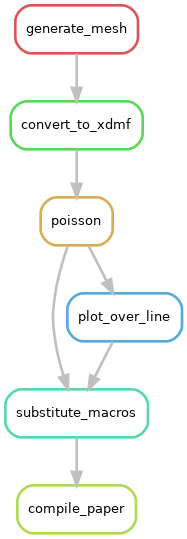
The domain size \(s\) is defined as an input to the workflow, such that the workflow can be run for different computational domains. The final output of the workflow is a PDF document showing the solution \(u\) over the line \(L=\{(x, y)\in\varOmega\,\vert\,x=y\}\) and the number of degrees of freedom used in the finite element model. The (directed acyclic graph of the) workflow is shown below and consists of the following processes:
Partition of the computational domain using Gmsh,
gmsh -2 -setnumber domain_size 1.0 source/square.geo -o ./square.msh
meshio convert ./square.msh ./square.xdmf
Solution of the poisson equation using FEniCS,
python source/poisson.py --mesh ./square.xdmf --degree 2 --outputfile ./poisson.pvd
Postprocessing using ParaView,
pvbatch source/postprocessing.py ./poisson.pvd ./plotoverline.csv
Preparation of macro definitions,
python source/prepare_paper_macros.py --macro-template-file source/macros.tex.template \
    --plot-data-path ./plotoverline.csv --domain-size 1.0 --num-dofs num_dofs \
    --output-macro-file ./macros.tex
cp source/paper.tex ./paper.tex
tectonic ./paper.tex
It is important to note that the source files are regarded as static inputs, i.e. changing them may break the workflow and thus only the variable domain size should be exposed as an actual input parameter. The number of degrees of freedom is written to stdout by the FEniCS script source/poisson.py and used here to showcase how one might deal with output of integer type (i.e. non-file output). If the tool does not support this the number of degrees of freedom is written to a file.
Details on the specific versions used for each software package can be found in the conda environment specification file. Exemplary implementations with various tools can be found here.